When most homeowners think about House Cleaning Dallas TX, they picture the obvious areas: kitchen counters, bathroom floors, carpets, and dusty shelves. But one area often gets overlooked even though it can collect an impressive amount of dust — the entertainment center. Between tangled cords, power strips, television stands, gaming systems, streaming devices, speakers, and narrow spaces behind electronics, entertainment areas can become hidden dust traps.
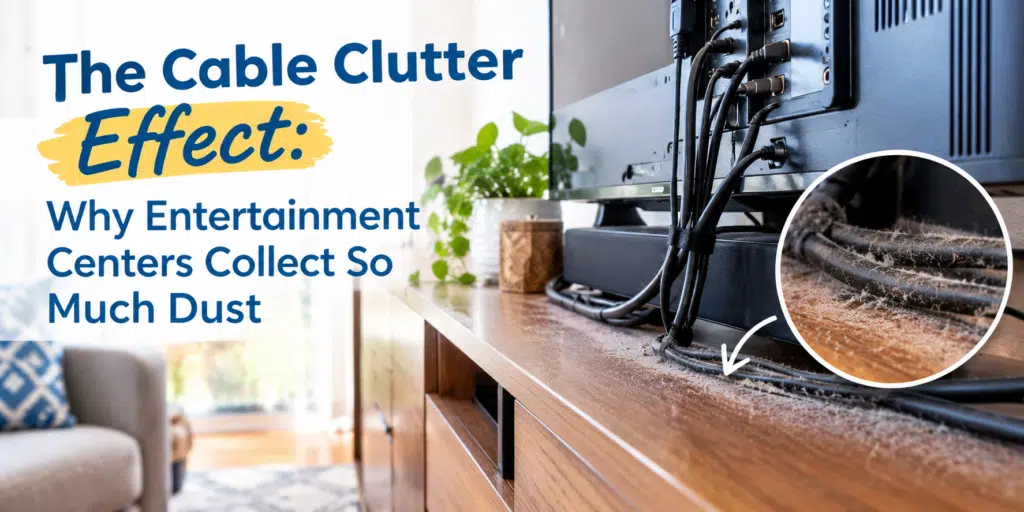
You may wipe the television screen and dust the top of the TV stand, only to notice that dust keeps returning. The problem may not be the surfaces you can easily see. Dust can settle around cables, collect behind electronics, and become trapped in tight spaces where a regular duster or vacuum cannot easily reach.
Understanding why entertainment centers collect so much dust can make your cleaning routine more effective. It can also help you recognize when regular dusting is no longer enough and a more detailed cleaning is needed.
Why Entertainment Centers Attract So Much Dust
Entertainment centers are almost perfectly designed to collect dust.
They usually contain several objects packed closely together, with cables running between them. Some components generate heat, while others sit on shelves or inside cabinets where air movement is limited. The result is a combination of tight spaces, airflow, static, and clutter that allows dust to accumulate.
Dust is made up of a mixture of tiny particles, including fibers, hair, skin flakes, outdoor particles, and other household debris. These particles move through the air and eventually settle on surfaces.
An entertainment center gives those particles plenty of places to land.
Electronics Create Warm Air and Airflow
Televisions, gaming consoles, receivers, routers, and other electronics produce heat during use. Fans and ventilation openings can also move air around the equipment.
That movement can carry airborne particles toward nearby surfaces.
Instead of simply falling straight to the floor, dust can circulate around the entertainment center before settling behind the television, along cables, underneath equipment, or inside small gaps.
Cords Create Extra Surfaces
A single television might have several cables attached to it. Add a streaming device, gaming console, soundbar, speakers, cable box, and other equipment, and suddenly there can be a network of cords behind the stand.
Every cable provides another surface where dust can settle.
When cords are tangled together, dust can also become caught between them. This makes the area harder to clean and allows buildup to remain undisturbed for longer periods.
The Hidden Dust Trap Behind the TV Stand
The space behind an entertainment center is often one of the least-cleaned areas in a home.
Homeowners may vacuum the visible floor in front of the television but rarely move the stand or carefully clean behind it. Over time, dust accumulates along the wall, baseboards, cords, and floor.
This hidden buildup can become especially noticeable when the furniture is eventually moved.
You may discover a layer of dust that has been sitting there for months.
Why Narrow Spaces Are Difficult to Clean
A vacuum attachment may not fit between the wall and entertainment center. A standard duster may be too thick. Reaching behind electronics can also be awkward.
When an area is difficult to access, it tends to be cleaned less frequently.
That creates a cycle:
- Dust enters the area.
- The narrow space makes cleaning difficult.
- Dust remains undisturbed.
- More particles accumulate.
- The buildup becomes harder to remove.
This is one reason deep cleaning Dallas TX services can make a noticeable difference in areas that are not part of everyday cleaning routines.
Power Strips Can Become Dust Magnets
Power strips are another overlooked part of entertainment center cleaning.
Many homes have a power strip hidden behind the television stand. It may be connected to several devices, with cords plugged into nearly every outlet.
Because power strips are often placed directly on the floor or tucked behind furniture, they can collect dust without anyone noticing.
Dust may accumulate:
- Around the edges of the power strip
- Between cords
- Underneath the strip
- Along nearby baseboards
- Around cable connections
- Behind the furniture
The more equipment connected to one area, the more complicated cleaning becomes.
Before cleaning around a power strip, electronics should be handled carefully. Avoid spraying cleaning products directly onto electrical components or connections.
Why Dust Builds Up Around Cords
Cords are easy to ignore because they are functional rather than decorative.
However, their position can make them excellent collection points for dust.
A cable lying across a shelf creates a small raised surface. Several cables bundled together create even more opportunities for particles to settle.
If the cables are pressed against a wall or furniture, dust can collect in the spaces around them.
Over time, the area may develop a visibly gray or fuzzy appearance.
Tangled Cables Make Cleaning Even Harder
Cable clutter does more than make an entertainment center look messy.
When cords are tangled, bundled, or stacked on top of one another, it becomes harder to reach the surfaces underneath them.
Instead of wiping the entire area, people often clean around the cables.
That means dust remains underneath.
Organizing cables can therefore be part of a better cleaning strategy. You do not necessarily need an elaborate cable-management system. Even separating cords and creating enough space to access the surface beneath them can make regular cleaning easier.
The Dust Under Electronics
The tops of electronics may receive occasional attention, but the spaces underneath them are often forgotten.
Gaming consoles, cable boxes, routers, speakers, and other equipment can sit directly on shelves or stands. Dust may settle beneath and around these devices.
Some electronics also have vents designed to allow heat to escape. Keeping the surrounding area reasonably clean helps prevent dust from becoming an unnecessary part of the equipment’s environment.
Cleaning electronics requires a lighter touch than cleaning ordinary household surfaces.
Use appropriate dry or lightly damp cleaning methods according to the manufacturer’s instructions, and never introduce moisture into vents, ports, plugs, or openings.
Why TV Stands Collect More Dust Than You Expect
A television stand can look clean from across the room while still holding significant dust.
Think about everything that may sit on or inside it:
- Remote controls
- Gaming consoles
- Speakers
- Streaming devices
- Controllers
- Decorative items
- Cable boxes
- Books and magazines
- Small electronics
Each item creates another surface or obstacle around which dust can accumulate.
Open shelving can be especially challenging because dust has easy access to the surfaces. Closed cabinets may protect some items, but dust can still collect on the cabinet exterior, handles, and surrounding floor.
Regularly removing unnecessary items can make the entire entertainment area easier to maintain.
How to Clean an Entertainment Center Properly
Cleaning around electronics requires patience. The goal is not simply to make the visible surfaces look clean for a few minutes. The goal is to remove dust from the areas where it actually accumulates.
Step 1: Clear the Area
Start by removing decorative items, remotes, controllers, and other movable objects.
This gives you access to the surfaces underneath them.
If the entertainment center is heavily cluttered, take a few minutes to decide which items actually need to remain there.
Less clutter means fewer places for dust to hide.
Step 2: Dust From Top to Bottom
Start with higher surfaces and work downward.
Dust the television stand, shelves, decorative objects, and accessible electronics before cleaning the floor.
This prevents loosened dust from immediately settling onto surfaces you have already cleaned.
Step 3: Carefully Address the Cords
Do not pull or yank cables.
Instead, gently separate accessible cords and clean around them using an appropriate dry microfiber cloth or cleaning tool.
If you need to disconnect equipment, make sure you know where each cable belongs before unplugging anything.
For complicated setups, taking a quick photo before disconnecting anything can make reconnecting equipment much easier.
Step 4: Reach Behind the Furniture
If it is safe to do so, carefully move the entertainment center enough to access the floor and wall area behind it.
This is where you may discover the biggest accumulation of dust.
Pay attention to:
- Baseboards
- Corners
- Wall-floor edges
- Cable bundles
- Behind the TV stand
- Under the furniture
- Areas around power strips
Step 5: Vacuum the Floor and Edges
Use a vacuum attachment to remove loose dust and debris.
Edges and corners deserve extra attention because dust tends to collect where surfaces meet.
If the furniture cannot be moved, use a narrow attachment or extension tool designed to reach underneath and behind furniture.
Don’t Forget the Walls and Baseboards
The wall behind an entertainment center can be easy to overlook.
When furniture remains in the same position for a long time, the wall and baseboard behind it may collect dust that is almost completely hidden from view.
Baseboards can also develop a dusty line along their upper edge.
This becomes especially noticeable when furniture is eventually rearranged.
As part of a thorough residential cleaning Dallas routine, occasionally cleaning these hidden edges can help keep the entire room looking fresher.
How Often Should You Clean Around Entertainment Centers?
There is no single schedule that works for every home.
Homes with pets, children, frequent visitors, or high levels of everyday activity may need more frequent dust removal.
For many households, visible entertainment center surfaces can be dusted weekly, while the hidden areas behind furniture can receive a more detailed cleaning every few weeks or whenever furniture is moved.
Consider cleaning the area more frequently if you notice:
- Dust accumulating quickly
- Visible buildup around cords
- Dust around electronic vents
- Pet hair collecting behind furniture
- A gray layer developing on the floor
- Dust returning shortly after cleaning
- Difficulty remembering the last time the furniture was moved
Regular cleaning does not have to mean completely unplugging your entertainment system every week. Focus on accessible surfaces routinely and tackle the harder-to-reach areas on a deeper schedule.
Cable Organization Can Reduce Cleaning Problems
Cleaning and organization go hand in hand.
You do not have to create a perfectly organized professional-looking entertainment center. The goal is simply to avoid creating a dense cluster of cables that makes cleaning nearly impossible.
A few simple improvements can help:
- Keep cords separated where practical.
- Avoid unnecessary cable tangles.
- Keep power strips accessible enough to clean around safely.
- Label complicated cables if equipment frequently gets disconnected.
- Avoid pushing furniture so tightly against the wall that the area becomes impossible to reach.
- Remove electronics and accessories you no longer use.
- Keep the floor underneath the entertainment center accessible.
A cleaner setup makes future cleaning much faster.
When Entertainment Center Dust Becomes Part of a Bigger Cleaning Problem
Sometimes dusty electronics are not an isolated issue.
If dust is collecting heavily around your entertainment center, it may also be accumulating under sofas, along baseboards, beneath beds, behind furniture, and in other overlooked areas.
That can be a sign that your routine cleaning is covering the visible surfaces while hidden areas are being missed.
This is where professional cleaners Dallas homeowners rely on can provide additional help.
A detailed cleaning approach looks beyond countertops and open floors. It considers the edges, corners, furniture, and difficult-to-reach areas that are easy to overlook during a busy week.
Entertainment Centers and Move-In or Move-Out Cleaning
Cable clutter can also become an issue when moving.
When a television and entertainment system are removed, homeowners may discover dust buildup that has been hidden behind the furniture.
A move can therefore reveal areas that have not been cleaned for a long time.
For renters, this is particularly important during a move-out.
A thorough move out cleaning Dallas service can help address accumulated dust and debris in areas that become visible after furniture and electronics are removed.
Likewise, during a move in cleaning Dallas TX service, cleaning the area before furniture and electronics are installed can make future maintenance easier.
Starting with a clean space is much easier than trying to clean around an already-established cable network.
Why Routine Cleaning Still Matters
Deep cleaning is useful, but it should not replace everyday maintenance.
Once an entertainment center has been thoroughly cleaned, keeping it manageable becomes much easier.
A simple weekly routine might include:
- Dusting the TV stand
- Wiping accessible shelves
- Cleaning remote controls
- Vacuuming around the furniture
- Removing visible pet hair
- Checking for dust around cables
- Straightening cords that have become tangled
Every few weeks, add a more detailed cleaning of the hidden areas.
This combination keeps dust from becoming a major buildup.
Keeping Dallas Homes Cleaner Starts With the Overlooked Areas
In a busy Dallas household, it is easy to focus on the areas that are immediately visible.
But cleanliness is not only about what guests see.
The dust behind the entertainment center, around power strips, beneath electronics, and along cords is part of the overall condition of the home.
If you consistently notice buildup returning in the same areas, the answer may not be to dust more aggressively. You may simply need to address the places where dust is allowed to collect undisturbed.
Whether you handle the work yourself or bring in a reliable house cleaning services in Dallas TX provider, paying attention to these hidden spaces can make your cleaning routine more complete.
Let Walo Maids Help With the Dust You Can’t Easily Reach
Entertainment centers are just one example of how dust can hide in a home.
Between cords, electronics, furniture, narrow gaps, baseboards, and hard-to-reach corners, some areas require more time and attention than a quick weekly cleanup allows.
If your home needs more than surface-level dusting, House Cleaning Dallas TX services from Walo Maids can help you tackle the areas that are easy to overlook.
A cleaner entertainment center is not just about having a spotless television stand. It is about reducing the hidden buildup around the furniture and creating a space that is easier to maintain.
When dust has fewer places to hide, your whole room can feel cleaner.
For dependable House Cleaning Dallas TX services, Walo Maids can help keep your home fresh, detailed, and comfortable — from the surfaces you see every day to the hidden spaces behind them.
Contact us at 214–390–3387 or visit https://walomaids.com/ to book your service.